

Good computer shop design does three jobs at once. It lets customers try laptops and accessories without crowding the counter, it gives technicians a clean and safe place to work, and it keeps expensive stock secure and cool. A shop that gets these right looks professional from the pavement and sells faster inside.
Here’s the quick answer for anyone planning a shop: put open, touchable demo displays along the walls, a glass counter with locked storage at the centre of operations, a separate repair bench behind or beside it, and plan the electrical work (dedicated circuits, earthing, UPS backup) before a single piece of furniture is made.
In Kolkata, most computer shops sit in tight spaces. The Chandni Chowk market near Esplanade is packed with 100 to 200 sq ft units, shops near Salt Lake Sector V serve IT office workers who want quick repairs, and cyber and gaming cafes cluster near colleges around College Street and Jadavpur. At Espace n Design we’ve planned sales showrooms, repair counters and gaming cafes, and while they look different, they share the same core ideas. This guide walks through each type.
What is the best layout for a small computer shop?
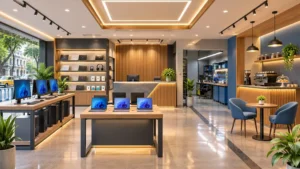
A wall-based layout works best: demo displays and accessory walls along both sides, an open centre aisle, and the billing counter towards the back so customers pass the products before they reach it. The repair desk, if you have one, sits behind the counter where customers can see work happening but can’t touch it.
A typical setup design for a 150 to 250 sq ft computer shop divides into four zones:
| Zone | Share of floor | What goes here |
|---|---|---|
| Entry and display | 30 to 35% | Laptop demo tables, a featured product stand, offers display |
| Accessory walls | 20 to 25% | Slatwall or pegboard with keyboards, mice, cables, headphones, storage drives |
| Counter and billing | 15 to 20% | Glass counter, billing PC, locked cabinets for high-value items |
| Service and storage | 25 to 30% | Repair bench, parts storage, cartons, network rack |
In narrow market shops, run the counter lengthwise along one wall rather than across the width. Customers can then walk the full depth of the shop, and the back third becomes a working area for repairs and storage. Keep the main aisle at least 3 ft wide; laptop buyers often come with a friend or family member, and two people need room to stand at a display together.
Put the most-wanted items, laptops and gaming gear, on the right-hand side and at eye level. Most people instinctively look right when they enter a shop. Cables, adaptors and cheaper accessories can sit nearer the counter, because people will look for them anyway.
Computer shop furniture design: what you actually need
The right computer shop furniture is modular, sturdy and built around power. Every display that holds a working laptop or monitor needs a socket nearby, and every counter needs locked storage. Here’s what we specify most often:
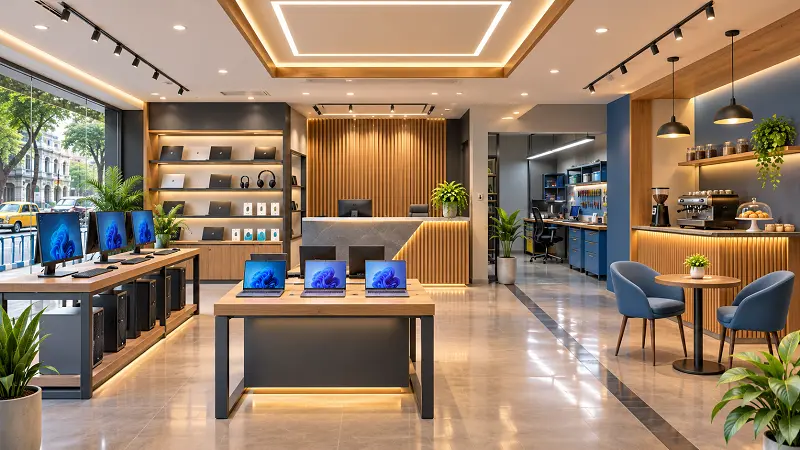
Laptop demo tables. Long tables or wall-mounted ledges about 30 to 32 inches high, with a cable grommet and power strip for every two or three laptops. Use security cables or alarm docks so devices can be tried but not taken. Leave around 18 inches of width per laptop so customers can actually type.
Accessory display walls. Slatwall panels or metal pegboards with hooks let you rearrange stock every week without calling a carpenter. Run them from about 1 ft to 7 ft high, with slower-moving boxed stock on a loft or top shelf.
Glass counter. A toughened glass display counter, around 36 to 38 inches high and 20 to 24 inches deep, shows processors, storage drives and smaller gadgets under lock. The staff side needs drawers for billing supplies, a cash drawer with a lock and a cabinet for boxed stock.
Monitor wall. If you sell monitors or desktops, a sturdy wall shelf or VESA-mount strip at eye level displays several screens running at once. It also makes a strong visual feature when seen from the street.
Closed storage. Cabinets with locks for high-value stock like graphics cards, laptops in boxes and phones. Keep them behind the counter or in the back zone, never near the entrance.
For materials, BWP plywood with laminate or powder-coated steel holds up best in Kolkata’s humid climate. MDF swells in the monsoon, and that’s the last thing you want on a counter that carries heavy monitors.
How do I design a computer repair shop?
Give repairs a dedicated, well-lit bench with anti-static protection, organised parts storage and plenty of power points, and keep it separated from the sales floor by the counter or a low glass partition. Customers like seeing their device being worked on, but technicians need a space that isn’t disturbed by footfall.
A good computer repair shop design includes:
A workbench at least 5 ft long and 24 to 30 inches deep, with an ESD (anti-static) mat, a wrist strap grounding point and a magnifier lamp. A bench height of about 30 inches suits seated work, while 36 inches suits standing work on desktops.
Small-parts storage with labelled drawer cabinets for screws, RAM, cables and connectors. Technicians lose a surprising amount of time hunting for parts in mixed boxes.
A shelf or rack for devices waiting for repair, with each device tagged by job number. It looks organised and avoids mix-ups, which is the most common complaint customers have about repair shops.
A separate intake counter where the customer hands over a device, a staff member logs the job, and a receipt is printed. Even a small shop benefits from separating intake from the actual repair work.
Light matters most at the bench. Use a bright neutral white (around 5000K) overhead plus an adjustable task lamp, so technicians can read small markings and spot damage clearly.
Computer cafe design: how to set up a cyber or gaming cafe
A computer cafe needs comfortable, evenly spaced stations, strong cooling and ventilation, reliable power backup and a layout that staff can supervise from one point. Gaming cafes add better chairs, larger desks and acoustic control, because noise rises fast with 15 people on headsets.
For desk sizes, a standard internet or browsing station works at about 30 to 36 inches wide and 24 inches deep. Gaming stations need more room, usually 42 to 48 inches wide and 30 inches deep, to fit a larger monitor, keyboard, mouse movement and a headset stand. Keep at least 3 to 3.5 ft of aisle behind each row of chairs so people can move without bumping into players.
Cooling is where many cafes go wrong. Each gaming PC can add a lot of heat to a small room, and Kolkata summers are already hot and humid. Plan the AC capacity with the total number of machines in mind, not just the floor area, and position outlets so cold air doesn’t blow straight at people. Good airflow also helps the machines run longer.
Acoustic panels on a couple of walls, a carpet tile or rubber floor in the gaming zone and soft-close doors all help with noise. For the look, dark walls with LED strip lighting are popular in gaming cafes, but keep task lighting at the desks so people can see the keyboard and the staff can see the room.
A small snacks and drinks counter near the entrance adds revenue and keeps food away from the machines. Many cafes near Kolkata colleges also add printing and scanning stations, which fit neatly beside the reception desk.
What rules apply to cyber cafe layouts in India?
India’s cyber cafe rules affect the furniture plan directly. Under Rule 6 of the Information Technology (Guidelines for Cyber Cafe) Rules, 2011, partitions or cubicles inside a cyber cafe can’t be taller than four and a half feet from the floor, and computers that aren’t inside cubicles must have their screens facing outward, towards the common open space of the cafe.
In practice, that means you can’t build private cabins with full-height walls, and the desk layout should face screens towards the room or the central aisle rather than towards a wall. Cafes also need to keep user ID records and logs, so the reception desk should have space for a PC, a webcam or ID scanner and a small printer. Requirements can vary by state and registration agency, so check with the local authority before finalising the plan. Designing the furniture around these rules from the beginning is much cheaper than rebuilding cubicles after an inspection.
What lighting and colours suit a computer shop?
Bright, neutral to cool white light with very little glare works best for computer shops, with accent lighting on the feature wall and display units. Colour schemes should stay clean and modern: white, light grey or graphite with one bold brand or tech colour such as electric blue, red or green.
Glare is the main thing to avoid. Shiny screens reflect bare tube lights and spotlights, making it hard for customers to see what they’re trying. Use diffused LED panels for general lighting, and position spotlights so they light the products, not the screens. In gaming cafes and gaming-focused shops, RGB strip lighting along shelves or the counter edge is a cheap way to signal the brand, but it should support the main lighting, not replace it.
For the floor, large matt vitrified tiles or vinyl are the most practical. They’re easy to clean, don’t hold dust and stay safe in the rain.
How do I protect computers from power cuts, heat and dust?
Plan electrical work, cooling and dust control as part of the interior, not as an afterthought. In a computer shop, a bad electrical layout costs more in damaged stock and lost sales than any furniture decision.
The basics we include in every computer shop interior are dedicated circuits for the display tables, the repair bench and the AC, so one overload doesn’t trip everything; proper earthing, checked and tested, which is essential for sensitive electronics; an online UPS or inverter backup for the billing system, network rack and key demo units, since even short power cuts can corrupt data and frustrate customers; surge protection on every power strip; and cable trays or trunking under desks and along walls, so cables are safe and easy to service.
For heat, keep the network rack and any servers in a ventilated cabinet or a corner with its own airflow. For dust, a glass shop front with a door closer and an air curtain or a small entry mat helps a lot, especially on busy roads where traffic dust settles on everything by evening.
How much does a computer shop interior cost in Kolkata?
The cost depends on shop size, the type of business (sales, repair or cafe), the furniture, the electrical and AC work and whether you need civil changes like a false ceiling or new flooring. A cafe with 20 gaming stations needs far more electrical and cooling work than a sales counter of the same size, and that changes the budget a lot.
For a realistic number for your shop, try our interior cost estimate. Share the size and what you need, and a designer will follow up with an estimate that reflects your actual space rather than a generic per-square-foot figure.
Most computer shops in Kolkata take three to five weeks from approved drawings to handover. If you’re targeting the busy back-to-college or Puja sales season, start the design at least six to eight weeks ahead.
Computer shop interior design ideas that make the biggest difference
A few ideas consistently lift a computer shop above the competition. A backlit brand wall with the shop name in acrylic or neon letters, visible from across the road, gives even a small “computer house” the presence of a bigger store. An open “try zone” where customers can pick up a laptop, adjust a chair or test a gaming headset builds trust faster than any salesperson. A neat glass-front repair corner shows customers their device is being handled carefully. And a clean shop front, with clear glass, good lighting and one or two posters at most, makes the place look busy and well run even late in the evening.
Planning a computer shop or cafe in Kolkata?
Espace n Design is an interior design company in Kolkata that plans shops, cafes, offices and homes. Our team works on commercial interior design in Kolkata, including computer showrooms, repair centres and gaming cafes, from site measurement and electrical planning through to handover.
Call or WhatsApp +91 90517 85452 to book a free site visit, or send us your shop’s dimensions and a few photos, and we’ll suggest a first layout.
Frequently asked questions
How much space is needed for a computer shop?
A sales and accessories shop can run well in 120 to 200 sq ft. If you add a repair bench, plan for at least 200 sq ft. A cyber or gaming cafe needs roughly 20 to 30 sq ft per station including aisle space, so a 10-station cafe needs 250 to 350 sq ft.
What is the ideal desk size for a gaming cafe?
Around 42 to 48 inches wide and 30 inches deep per station. Standard browsing stations can be smaller, at about 30 to 36 inches wide.
Should a computer shop have a false ceiling?
Usually yes. A gypsum false ceiling hides network cables, AC ducts and wiring, holds LED panels neatly and gives the shop a finished look. Keep access panels so cables can be serviced later.
Which flooring is best for a computer shop?
Large matt vitrified tiles or vinyl. In gaming cafes, carpet tiles or rubber flooring in the station area reduce noise. Avoid glossy tiles, which reflect light onto screens and get slippery in the rain.
Can a computer cafe have private cabins?
Not with full-height walls. Under India’s cyber cafe rules, partitions can’t exceed four and a half feet, and open screens should face the common space. Low partitions between stations are fine.
How do I make a small computer shop look premium?
Use one strong brand wall, bright glare-free lighting, a clean glass counter, matching furniture finishes and tidy cable management. Clutter and visible wires are what make tech shops look cheap.